Miro Review 2026: Best Visual Collaboration Platform for Remote Teams
Remote collaboration requires tools matching face-to-face brainstorming energy. Digital whiteboards replace physical meeting rooms letting distributed teams ideate, plan, and strategize together visually. Miro leads the visual collaboration space with infinite canvas, real-time updates, and extensive template library. This review examines whether Miro delivers productive remote teamwork in 2026.
What Is Miro
Miro is a cloud-based visual collaboration platform providing digital whiteboard workspace for distributed teams. Founded in 2011, Miro serves over 50 million users including companies like Netflix, Airbnb, and IKEA. The platform enables brainstorming, agile workflows, design thinking, user story mapping, strategic planning, and countless visual collaboration scenarios replacing or augmenting in-person workshops.
Unlike basic drawing tools, Miro provides structured collaboration features including templates, frameworks, integrations with business tools, and real-time multi-user editing. The infinite canvas philosophy means no space constraints unlike physical whiteboards. This digital-first approach enables async collaboration where team members contribute across time zones rather than requiring everyone online simultaneously.
How Does Miro Work
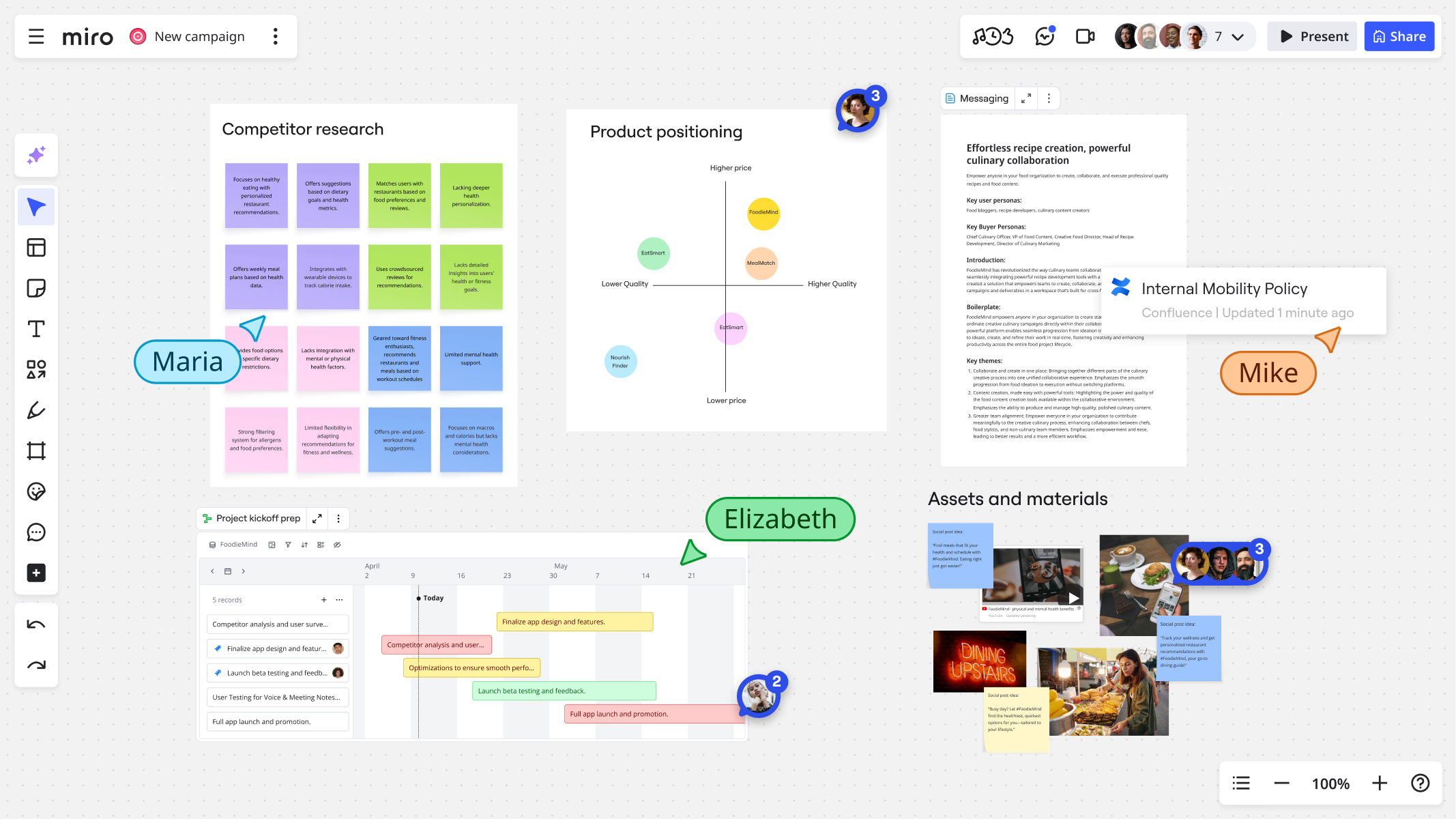
Miro works through board-based collaboration. Create board from blank canvas or choose template. Invite team members providing view, comment, or edit access. Add content using sticky notes, shapes, connectors, images, documents, and drawing tools. Team members collaborate simultaneously seeing real-time cursor positions and changes. Comment on specific elements discussing ideas. Export boards or present directly in meetings. Save and return to boards over time as projects evolve.
The platform syncs everything in cloud. No save buttons or version confusion. Everyone always sees current state. Undo history lets you revert mistakes. Board templates accelerate setup for common activities. Integration with video conferencing tools enables presenting boards during calls. This seamless collaborative experience mimics physical whiteboarding while adding digital superpowers.
Infinite Canvas and Navigation
Miro's infinite canvas provides unlimited workspace without boundaries. Zoom out seeing entire board at once. Zoom in focusing on specific sections with full detail. Pan across canvas exploring different areas. Create frames organizing content into sections like presentation slides or workshop stages. Sticky notes, shapes, and objects arrange freely without grid constraints.
Minimap shows board overview with current viewport highlighted. Named frames enable quick navigation between board sections. Search functionality finds specific content across large boards. This unlimited space means complex projects spread naturally without cramped constraints physical whiteboards impose. However, infinite space requires organizational discipline preventing boards from becoming chaotic.
Core Collaboration Features
Real-time collaboration shows cursor positions labeled with team member names. See who's working where and what they're adding. Live reactions with emojis provide quick feedback without interrupting flow. Comments tag specific board elements creating threaded discussions. @mentions notify team members about relevant conversations or areas needing input.
Video chat integration puts faces alongside boards during synchronous sessions. Timer tool keeps workshops on schedule. Voting features gather team preferences on ideas or designs. Anonymous mode hides cursor names reducing groupthink during independent brainstorming. These collaboration tools balance independent thinking with group synthesis creating productive hybrid workflows.
Template Library
Miro provides 2,000+ templates across categories including brainstorming, agile workflows, mapping and diagramming, workshops and meetings, strategy and planning, and design and UX research. Popular templates include SWOT analysis, customer journey maps, Kanban boards, sprint retrospectives, user story mapping, and mind maps. Each template includes structure and guidance helping teams start quickly.
Custom templates save frequently used board structures. Organizations create template libraries standardizing common workflows. Miroverse community shares public templates created by other users. Template quality varies but professional templates provide excellent starting points saving hours of setup time. The extensive library means rarely starting from blank canvas unless intentionally desired.
Sticky Notes and Text
Digital sticky notes mimic physical post-its with colors, tags, and clustering. Create notes rapidly using keyboard shortcuts. Bulk edit multiple notes simultaneously changing colors or adding tags. Rich text formatting supports headings, lists, and links. Notes scale automatically keeping text readable regardless of zoom level.
Voting functionality adds dots to notes during prioritization exercises. Timers create urgency during timed brainstorming. Note connections link related ideas. Tags organize notes into categories. These enhancements make digital stickies more powerful than physical versions while maintaining familiar interaction model everyone understands.
Shapes, Connectors, and Diagrams
Shape library includes flowchart symbols, UML diagrams, organizational charts, wireframe elements, and basic geometric shapes. Smart connectors automatically attach to shapes adjusting as objects move. Line styles including arrows, dashed lines, and curved paths provide visual variety. Text labels annotate connections explaining relationships.
These diagramming tools serve use cases like process mapping, system architecture diagrams, user flow design, org chart visualization, and network mapping. While not matching specialized diagramming tools like Lucidchart in depth, Miro's shapes handle most common diagramming needs within broader collaboration context.
Frameworks and Facilitation Tools
Workshop frameworks guide facilitated sessions. Templates include Design Sprint structures, Lean Canvas, Business Model Canvas, OKR planning, and Value Proposition Canvas. These frameworks embed best practices from innovation methodologies providing structure to complex strategic activities.
Facilitation tools include voting, timers, presentation mode, attention management pulling everyone to specific areas, and activity generation creating randomly assigned teams or randomized ideas. These features particularly serve meeting facilitators running structured workshops whether for strategic planning, product design, or team building.
Integration Ecosystem
Miro integrates with 130+ business tools. Video conferencing integrations with Zoom, Microsoft Teams, and Google Meet embed boards directly in calls. Project management connections with Jira, Asana, and Trello sync boards with task tracking. Design tool integrations with Figma and Sketch import designs. Documentation connections with Confluence, Notion, and Google Docs embed boards in knowledge bases.
Slack integration shares boards and notifications. Microsoft and Google workspace integrations provide single sign-on and file import. Developer API enables custom integrations. These connections ensure Miro works within existing tool ecosystems rather than creating isolated workspace.
Presentation Mode
Presentation mode turns boards into slideshow-like experiences. Navigate between frames as slides. Audience members follow presenter's viewport automatically. Laser pointer highlights specific areas. Drawing tools annotate during presentation. Screen share presentations directly in video calls without switching applications.
This presentation capability means boards serve dual purposes: collaborative workspace during development and presentation medium during review. No need to rebuild content in separate presentation software. Changes made during presentations update boards in real-time. The integrated present-and-collaborate workflow saves time and maintains single source of truth.
Miro AI Features
AI capabilities automate repetitive tasks. AI clustering groups similar sticky notes automatically during brainstorming analysis. AI summaries generate text descriptions of board content. Smart drawing converts rough sketches into clean shapes. AI suggestions recommend templates based on board content. These features accelerate common workflows without replacing human thinking.
The AI assistance particularly helps large workshops where manually organizing hundreds of sticky notes becomes tedious. However, AI should augment human facilitation not replace it. Teams still need facilitation skills and structured processes. AI just removes mechanical work leaving more time for strategic thinking and discussion.
Mobile Experience
iOS and Android apps provide full Miro functionality on tablets and smartphones. View boards, add content, participate in real-time collaboration, and present from mobile devices. Touch optimizations make object manipulation natural on touchscreens. Offline mode caches boards for viewing without connectivity though editing requires internet.
Mobile experience serves field teams, traveling professionals, and anyone needing board access away from desk. Tablet experience particularly shines combining portability with large screen. Mobile apps ensure Miro remains accessible regardless of device availability supporting truly flexible work arrangements.
Miro Pricing Structure
Miro offers free tier with three editable boards suitable for personal use or small team testing. Starter plan at $8 per member monthly includes unlimited boards, templates, and basic collaboration. Business plan at $16 per member monthly adds advanced features including private boards, custom templates, and priority support. Enterprise plan provides custom pricing with admin controls, security features, and dedicated support.
Educational institutions receive special pricing. Free tier generously supports genuine collaboration not just demos. Paid plans scale by team size with discounts for larger teams. Annual billing provides savings versus monthly. The pricing remains accessible for small teams while enterprise features serve large organizations.
Miro Strengths
Strengths include intuitive interface requiring minimal learning curve, extensive template library accelerating common activities, strong real-time collaboration with smooth multi-user editing, infinite canvas removing space constraints, comprehensive integration ecosystem, and active development adding new features regularly. The balance of ease-of-use and depth serves diverse collaboration scenarios.
Miro Limitations
Limitations include boards becoming cluttered on complex projects without discipline, free tier restricted to three boards limiting serious usage, occasional performance lag on extremely large boards, mobile experience less capable than desktop for complex editing, limited offline functionality, and integration depth varies across connected tools. Teams needing advanced diagramming might want specialized tools alongside Miro.
Who Should Use Miro
Miro works best for distributed teams needing visual collaboration tools. Design teams conducting user research and ideation benefit from infinite canvas. Agile software teams managing sprints and retrospectives appreciate agile templates. Strategy teams planning roadmaps and OKRs leverage planning frameworks. Workshop facilitators running structured sessions find facilitation tools valuable. Educational instructors teaching collaborative courses use Miro for student activities.
Getting Started with Miro
Sign up for free account and explore template library. Create first board using template matching your team activity. Invite team members to collaborate. Run simple brainstorming session getting comfortable with tools. Integrate with video conferencing for combined meetings. Most teams become productive within first few sessions discovering advanced features over time through exploration.
Is Miro Worth It in 2026
Miro delivers strong value for remote and hybrid teams requiring visual collaboration. The platform successfully replicates and often exceeds physical whiteboarding capabilities. Teams running regular workshops, brainstorming sessions, or visual planning find clear productivity gains. However, teams rarely needing visual collaboration or working primarily asynchronously through documents might not justify subscription costs. Evaluate whether your team's collaboration style benefits from visual, synchronous interaction before committing organization-wide.
Start Your Webflow Journey
Discover the power of Webflow and begin creating beautiful, responsive websites today. Click below to get started directly on Webflow’s platform.
You Might Also Like
Explore our recommended articles for more Webflow tips, tricks, and inspiration to enhance your design workflow.