Monday.com Review 2026: Best Work Operating System for Team Collaboration
Team collaboration tools determine whether projects succeed or spiral into chaos. The right platform keeps everyone aligned, work organized, and progress visible. Monday.com positions itself as a Work Operating System rather than just project management software, promising to centralize all work in one customizable platform. This comprehensive review examines whether Monday.com delivers on its ambitious vision in 2026.
What Is Monday.com
Monday.com is a cloud-based Work Operating System that lets teams manage projects, workflows, and everyday work through customizable boards and automations. Founded in 2012 as daPulse and rebranded to Monday.com in 2017, the platform serves over 180,000 customers globally across industries from marketing agencies to software development to construction management.
Unlike traditional project management tools with rigid structures, Monday.com provides flexible building blocks. Teams create custom workflows matching their exact processes rather than adapting to predetermined templates. This flexibility makes Monday.com suitable for diverse use cases: project tracking, CRM, content calendars, resource planning, bug tracking, event management, and countless other workflows. The core philosophy is one platform for all work rather than juggling multiple specialized tools.
How Does Monday.com Work
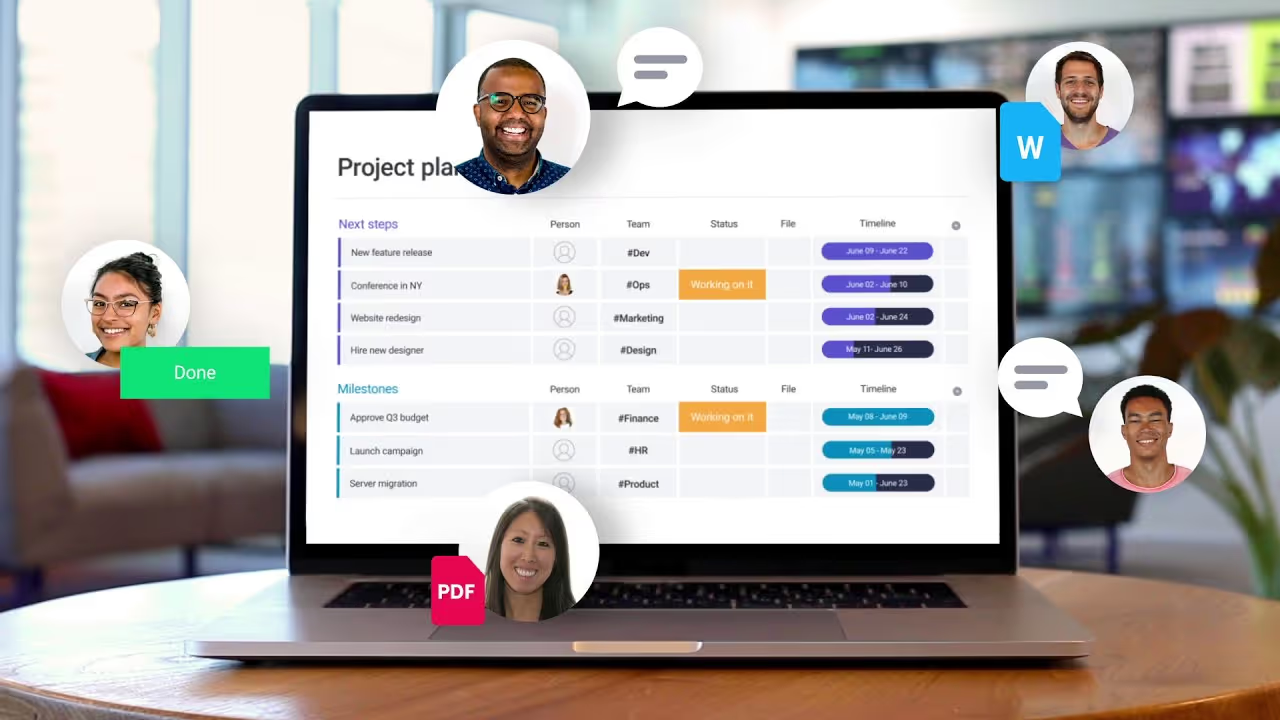
Monday.com works through a board-based interface similar to spreadsheets but with powerful features underneath. Each board represents a project, process, or workflow. Boards contain items which are individual tasks, deals, content pieces, or whatever unit makes sense for your work. Items have columns storing different types of information: status, people, dates, files, numbers, text, and 30+ other column types.
Teams customize boards by adding relevant columns, creating automations that trigger actions when conditions are met, building dashboards visualizing data across multiple boards, and setting up integrations connecting Monday.com to other tools. The platform handles everything from simple to-do lists to complex multi-team projects with dependencies, milestones, and resource allocation. Real-time updates keep everyone synchronized regardless of location or time zone.
Core Board and Item Features
Boards provide the foundation for organizing work in Monday.com. Create unlimited boards for different projects, departments, or workflows. Each board displays items in rows with customizable columns showing relevant information. Color coding, labels, and grouping organize items visually. Filtering and sorting help teams focus on what matters without overwhelming detail.
Items represent individual work units. Click any item to open a detailed view showing all information, updates, files, and conversations related to that work. The updates section functions like an item-specific timeline where team members discuss progress, ask questions, and share context. File attachments centralize documents rather than scattering them across email. This item-centric approach keeps all relevant information together rather than forcing searches across multiple tools.
Multiple View Types
Monday.com offers seven primary view types for displaying board data. Main Table view shows traditional row-and-column layout. Kanban view displays items as cards moving through workflow stages. Calendar view schedules items on a date grid. Timeline (Gantt) view visualizes project schedules with dependencies. Chart view analyzes data with customizable graphs. Map view shows items with location data on geographic maps. Form view collects information from external stakeholders.
Workflow Automations
Automations eliminate repetitive manual work by triggering actions when specified conditions occur. When status changes to Done, automatically notify the client and move the item to the completed group. When deadline approaches within three days, send reminder notifications. When new item is created, assign it to specific person and set default values. Monday.com provides 200+ automation templates covering common scenarios.
Integration Ecosystem
Monday.com integrates with 200+ popular business tools including Slack, Microsoft Teams, Gmail, Outlook, Google Drive, Dropbox, Zoom, Salesforce, HubSpot, Jira, GitHub, Adobe Creative Cloud, and QuickBooks. Native integrations sync data bidirectionally, triggering actions in Monday.com based on external events and vice versa.
Dashboards and Reporting
Dashboards aggregate data from multiple boards into visual displays showing high-level metrics and progress. Build dashboards with 30+ widget types including charts, numbers, timelines, tables, and custom widgets. Executives get project portfolio overviews. Team leaders monitor workload distribution. Individuals track personal tasks across multiple projects. Dashboards update in real-time as underlying board data changes.
Collaboration and Communication
Monday.com centralizes team communication around work rather than scattering conversations across email and chat. The updates section on each item creates threaded discussions specific to that work. Mention team members to notify them. Share files, links, and screenshots directly in updates. This context-specific communication means conversations stay attached to relevant work rather than getting lost in overflowing inboxes.
Mobile Experience
The Monday.com mobile app for iOS and Android provides full access to boards, items, and dashboards on smartphones and tablets. Create and update items, respond to updates, upload files, and receive notifications while away from desk. The mobile interface optimizes for touchscreens with gesture-based interactions and simplified layouts.
Template Marketplace
Monday.com provides 200+ pre-built templates for common use cases across industries and departments. Marketing templates include campaign planning, content calendars, and creative requests. Development templates cover sprint planning, bug tracking, and feature roadmaps. Sales templates manage pipelines, leads, and customer onboarding. HR templates handle recruitment, employee onboarding, and time-off tracking.
Monday.com Pricing Structure
Monday.com offers tiered pricing based on features and user count. Individual plan is free forever with limited features, suitable for personal task management. Basic plan starts at $9 per seat monthly with core features and unlimited boards. Standard plan at $12 per seat monthly adds timeline and calendar views, automations, and integrations. Pro plan at $19 per seat monthly includes advanced features like time tracking, formula columns, and dependency management.
Enterprise plan provides custom pricing with advanced security, governance, and support. All paid plans include unlimited boards and items. Pricing decreases per user as team size increases, rewarding organization-wide adoption. Free trials let teams test paid features before committing. Annual billing offers discounts compared to monthly payments.
Customization Capabilities
Monday.com's customization depth sets it apart from rigid project management tools. Create custom column types combining existing types. Design custom automations using conditional logic. Build tailored dashboards showing exactly the metrics you need. Adjust board colors, layouts, and groupings matching your preferences. This flexibility means Monday.com adapts to how your team works rather than forcing you into predetermined workflows.
Time Tracking and Resource Management
Built-in time tracking lets team members log hours worked on specific items directly in Monday.com. Track billable versus non-billable time, analyze where time is spent, and generate timesheets for payroll or client billing. Integrations with Harvest, Toggl, and Clockify provide additional time tracking options for teams with existing preferences.
Guest and Client Access
Invite external stakeholders as guests with limited access to specific boards. Clients can view project status, provide feedback, and upload files without seeing internal discussions or other projects. Set granular permissions controlling what guests can view, edit, or comment on. This external collaboration eliminates endless status update emails while maintaining appropriate information boundaries.
Security and Compliance
Monday.com implements enterprise-grade security including SSL encryption for data transmission, encrypted data storage, SOC 2 Type II compliance, ISO 27001 certification, and GDPR compliance. Two-factor authentication protects accounts from unauthorized access. Single sign-on integrates with corporate identity providers like Okta, Azure AD, and OneLogin. IP restrictions limit access to approved networks.
Learning Curve and Onboarding
Monday.com's interface is intuitive for basic use but the depth of features creates learning curve for advanced functionality. New users can create boards and manage items within minutes. Mastering automations, formulas, and advanced customization takes longer. The platform provides extensive documentation, video tutorials, webinars, and a community forum supporting learning.
Monday.com Strengths
Monday.com excels at flexibility and customization, adapting to virtually any workflow rather than forcing predefined processes. The visual interface makes complex projects understandable at a glance. Powerful automations eliminate repetitive work without requiring coding skills. Robust integrations connect Monday.com to existing tools rather than requiring wholesale replacement. Strong mobile experience supports remote and field teams.
Monday.com Limitations
Pricing becomes expensive for large teams with per-seat costs adding up quickly. The abundance of features can overwhelm users preferring simpler tools. Some advanced capabilities like formulas require learning curve. Customization flexibility means teams might create inconsistent processes without governance. Reporting and analytics, while functional, are less sophisticated than specialized business intelligence tools.
Who Should Use Monday.com
Monday.com works best for teams managing multiple projects requiring visibility and coordination. Marketing teams coordinating campaigns across content, design, and promotion benefit from centralized planning. Software development teams tracking features, bugs, and releases find the flexibility useful. Agencies managing multiple client projects need the board-per-project structure. Operations teams standardizing processes across departments benefit from template and automation capabilities.
Comparison with Alternatives
Compared to Asana, Monday.com offers more visual customization and flexibility while Asana provides simpler, cleaner interface. Versus Trello, Monday.com delivers significantly more features and scalability though Trello wins on simplicity. Against Jira, Monday.com has gentler learning curve and better visual design while Jira offers deeper software development features. Compared to ClickUp, Monday.com has more polished interface though ClickUp packs more features at lower prices.
Getting Started with Monday.com
Sign up for a free account to explore basic features. Choose a template matching your use case or start with a blank board. Add team members and invite them to collaborate. Create items representing your work and customize columns for relevant information. Set up simple automations for repetitive tasks. Build a basic dashboard showing key metrics.
Best Practices for Success
Successful Monday.com adoption requires thoughtful setup and governance. Establish naming conventions for boards and items ensuring consistency. Create template boards standardizing processes across projects. Define clear automation strategies avoiding notification overload. Set guidelines for when to use updates versus external communication. Train all users on core features rather than assuming intuitive adoption.
Advanced Use Cases
Beyond basic project management, Monday.com enables sophisticated workflows. Build custom CRM systems tracking sales pipelines, customer interactions, and renewal management. Create content production systems managing ideation through publication with approval workflows. Implement resource planning allocating people to projects while tracking capacity. Design IT service desks routing support tickets through resolution processes.
Is Monday.com Worth It in 2026
Monday.com delivers strong value for teams needing flexible, visual collaboration tools for managing projects and workflows. The combination of ease of use, powerful features, and customization depth serves diverse needs from simple task tracking to complex portfolio management. Teams collaborating across multiple projects, requiring transparency into work status, and valuing visual organization over text-based tools find Monday.com particularly valuable.
However, the cost considerations are real for large teams where per-seat pricing accumulates significantly. Very small teams or individuals might find free or simpler alternatives sufficient. Organizations wanting minimal learning curve may prefer simpler tools. Teams with very specialized needs like software development might benefit from purpose-built tools over flexible generalist platforms. Evaluate whether Monday.com's flexibility and visual approach justify costs and complexity for your specific situation before committing organization-wide.
Start Your Webflow Journey
Discover the power of Webflow and begin creating beautiful, responsive websites today. Click below to get started directly on Webflow’s platform.
You Might Also Like
Explore our recommended articles for more Webflow tips, tricks, and inspiration to enhance your design workflow.
.avif)
%20(1).avif)