ClickUp Review 2026: Is It Really the One App to Replace Them All?
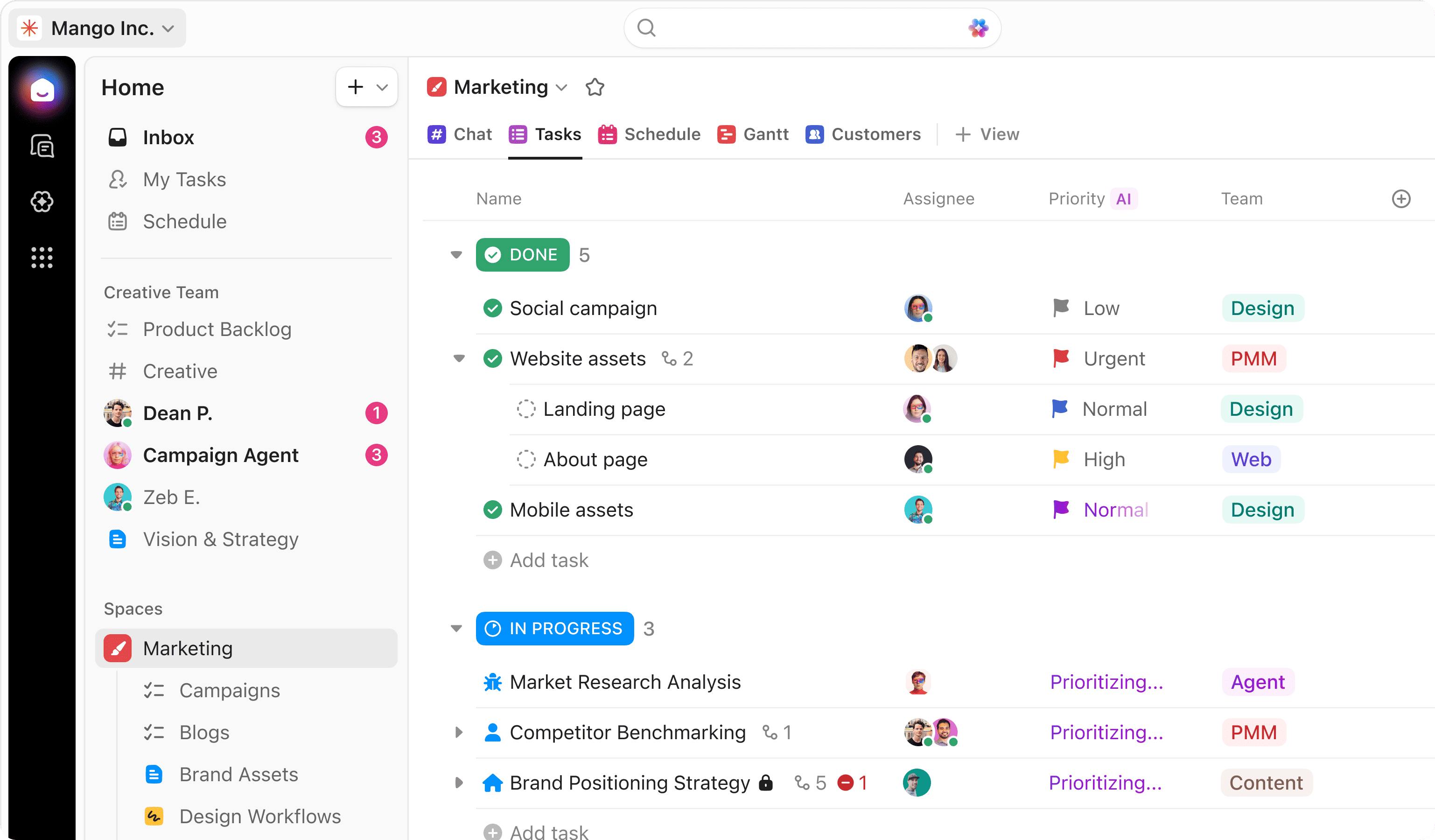
ClickUp has been making bold promises for years. "One app to replace them all" is not a subtle tagline. But in 2026, with the project management tool market more crowded than ever, the question is whether ClickUp actually delivers -- or whether the ambition has outrun the product.
After spending time with the platform across several real workflows, here is an honest look at what ClickUp gets right, where it still has rough edges, and who should actually be using it.
What ClickUp Is (and What It Wants to Be)
ClickUp is a project management and productivity platform that covers an unusually wide surface area: tasks, docs, goals, whiteboards, time tracking, dashboards, automations, and more -- all within a single workspace.
The pitch is consolidation. Instead of running Asana for tasks, Notion for docs, Toggl for time tracking, and a separate tool for dashboards, you run ClickUp and handle most of it in one place.
That pitch has always been compelling. What has changed in 2026 is that ClickUp has gotten meaningfully better at making it feel coherent rather than chaotic.
What Works Well
The task and project layer is genuinely powerful. ClickUp's hierarchy -- Workspaces, Spaces, Folders, Lists, Tasks -- gives you real flexibility in how you structure work. Whether you are running a product sprint, a client retainer, or a content calendar, you can adapt the structure to fit the workflow rather than forcing your workflow into a rigid system.
Multiple views without the overhead. Switching between List, Board, Gantt, Calendar, and Table views is smooth, and each view remembers your settings. A developer might live in the List view while a designer prefers Board -- and both can work in the same project without friction.
Automations are surprisingly accessible. You do not need to be technical to set up meaningful automations in ClickUp. "When a task moves to Done, notify the assignee and close all subtasks" takes under a minute to configure. For lean teams running without dedicated ops people, this is a genuine time-saver.
Docs are actually integrated, not bolted on. ClickUp's Docs link naturally to tasks, support real-time collaboration, and are searchable within your workspace. Not Notion-level deep, but good enough to replace a separate docs tool for most teams.
AI features are maturing. ClickUp AI in 2026 can summarize threads, draft task descriptions, generate action items from meeting notes, and help you write status updates. It integrates tightly with the rest of the platform in a way that feels native rather than grafted on.
Where It Gets Complicated
No review of ClickUp would be honest without acknowledging the learning curve.
The platform is dense. There are a lot of settings, a lot of views, and a lot of ways to do the same thing. For a solo founder or a small team trying to move fast, the initial setup can feel overwhelming. The flexibility that makes ClickUp powerful for complex organizations is the same flexibility that can slow you down when you just want to track a simple project.
The mobile app experience is still not fully on par with the desktop. If you manage tasks primarily from your phone, this is worth factoring in before committing. And notifications can get noisy quickly if you do not invest time upfront in configuring your preferences.
Who ClickUp Is Right For
ClickUp is a strong fit if:
- You are running a startup or small-to-medium team currently juggling three or more separate tools for project management, docs, and tracking.
- You have someone -- even part-time -- who can invest a few hours in setting up the workspace properly at the start.
- You want a single source of truth for work across multiple types of projects and teams.
- You are looking for a platform that will grow with you over time.
It is probably not the right fit if you want something you can onboard your team to in 30 minutes, or if your work is highly specialized in a way that requires dedicated tooling.
Pricing in 2026
ClickUp has a generous free plan that covers a lot of what small teams need. The paid plans -- Unlimited, Business, and Enterprise -- unlock automations, advanced reporting, time tracking, and priority support. For most growing startups, the Business plan hits the right balance of capability and cost.
It is worth starting on the free plan to validate that the tool fits how your team actually works before committing. You can create your free ClickUp account here and explore the full feature set without any upfront cost.
The Bottom Line
ClickUp is not a perfect tool, but it is a serious one. In 2026, it has closed the gap on some of its earlier rough edges while continuing to expand what the platform can do. The AI layer is stronger, the doc integration feels more natural, and the automation builder has become genuinely accessible to non-technical users.
If you are tired of context-switching between tools and want one place to manage most of your operational work, ClickUp is worth a real evaluation. The depth is there. The flexibility is there. The main variable is whether you are willing to invest the setup time to make it work for your specific workflow.
For startups and lean digital teams building for the long term, that investment usually pays off quickly. Get started with ClickUp for free and see how it fits your workflow.
Start Your Webflow Journey
Discover the power of Webflow and begin creating beautiful, responsive websites today. Click below to get started directly on Webflow’s platform.
You Might Also Like
Explore our recommended articles for more Webflow tips, tricks, and inspiration to enhance your design workflow.